Focus Button device support – Added support for a physical Focus Button device that connects to your desktop, letting you start focus sessions with a single press.
Suggested Focus Mode prompts – When you open a site that matches one of your Focus Modes, the app can now suggest starting that mode automatically, helping you get into focus faster with less manual setup.
New keyboard shortcuts for productivity tools – You can now quickly open Brain Dump, Focus Music, and the Task List using keyboard shortcuts for faster access while working.
Improvement
Updated AI popup behavior in Super Strict mode – In regular Super Strict mode, AI popups still appear so you can try to convince AI to allow a site without changing your intention. But if Grizzly mode is enabled, the popup is skipped entirely and distracting sites are blocked immediately for stricter enforcement.
Improved handling for always blocked sites and apps – In Grizzly mode, blocked apps and sites are denied instantly, while Cuddly mode allows you to request temporary access with a time limit. If “Immediately Blocked” is enabled, access is blocked right away regardless of mode.
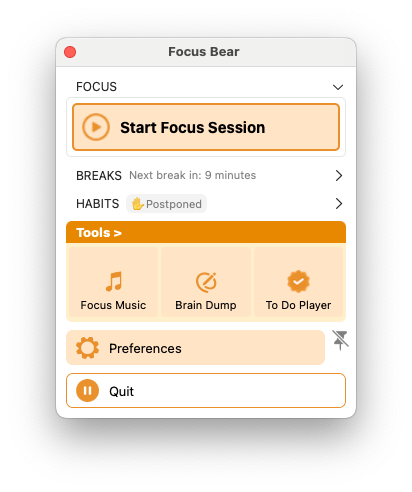
Optimized menu with accordion status indicators – Closed accordion sections in the menu now display their current status, making it easier to understand your setup at a glance without expanding everything.
Notifications now disabled by default for Block Lists – New Block Lists and focus modes now start with notifications turned off to reduce unnecessary interruptions.
Breaks now start instantly – Clicking “Start Break” immediately begins the break without extra waiting or delay.
Bug fixes
Fixed FBTT tracking issues – FBTT tracking now updates reliably without missing activity.
Fixed LNM notifications resetting break timers – Receiving a Late No More notification will no longer reset your active break timer.
Fixed break ratio setting resetting unexpectedly – Your configured break ratio now stays saved correctly between sessions.
Fixed current task not being passed to AI – AI blocking now correctly receives your active task for more accurate decisions.
Fixed an app crash affecting stability – Resolved a crash that could unexpectedly close the app.
Fixed break prompts not appearing – Break reminders now trigger properly in situations where they were previously skipped.
Fixed AI popup not showing the correct current task – The AI popup now correctly displays your active task instead of ignoring newly added or existing tasks.
Fixed Super Strict focus sessions not allowing time reduction – You can now properly decrease focus session time when allowed within Super Strict mode rules.
Fixed blocking schedules not loading correctly – Blocking schedules now load reliably without missing or broken states.
Added clearer feedback for blocked actions – The app now explains why certain actions are blocked, such as trying to start another focus session during strict blocking.
Fixed Late No More calendar refresh issue – Calendar lists in Late No More now refresh properly and stay up to date.
Fixed custom blocking schedules not running after aborted shutoff – Blocking schedules now continue working correctly even after Wind Down or an aborted shutoff flow.
Fixed blocking schedules activating at the wrong time – Blocking schedules now trigger at their correct scheduled times more reliably.
Fixed Focus Music and Stop buttons on newer OS versions – Focus Music controls and stop actions in the To-Do Player now work properly on newer operating systems.
Fixed Tools section becoming disabled on certain screens – Tools now remain accessible and usable across all supported windows and screens.
Fixed permissions banner staying visible after setup – The permissions warning banner now disappears correctly once all required permissions are granted in Blocking Schedule.
Fixed app not restarting automatically after settings changes – The app now restarts properly when required settings are updated.
Fixed repeated Basic vs Pro upgrade popup – Your upgrade choice is now remembered so the popup doesn’t reappear every time the app launches.
Fixed allowed apps habits triggering postpone unexpectedly – Closing the main window during an allowed apps activity no longer triggers a postpone action.
Fixed blocking schedules overwriting postpone intentions – Your postpone intention is now preserved correctly even when a blocking schedule is active.